Agentic Patterns I Use
Introduction: Why Patterns Matter When Agents Write Code
Agents can generate, refactor, and modify code faster than you can read it. That’s both an amazing boon and a giant problem. Speed without guardrails doesn’t give you velocity; it gives you chaos. Broken builds, security holes, architectural drift that compounds until the codebase stops making sense.
These are the patterns that I have used over the past 6 months of agent-driven development. They’re what I’ve learned works when you’re actually shipping code with agents, not just experimenting in a sandbox. Nothing here is going to be earth-shattering; there is a healthy dose of common-sense engineering practices, but i find that when people forget the hard-won engineering lessons the moment they experience the euphoria of seeing applications come together in hours rather than days.
The goal is simple: preserve the speed advantage while maintaining quality, safety, and sanity. Patterns create the container that lets agents move fast without breaking things.
1. Use Git Religiously
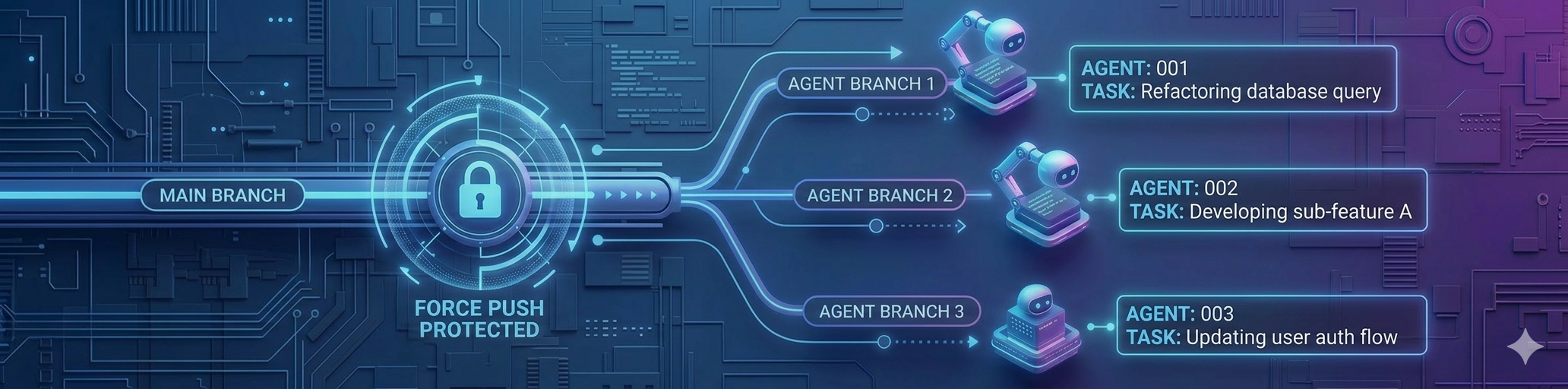 Every agent-modified codebase lives in git. Always. No exceptions.
Main branch is protected from force pushes. Agents work on branches. Changes are committed with context — not just “update feature” but what changed and why. You need a record of what changed, when, and why.
When an agent makes a mistake — and it will — git is your way out. Agents can make vast changes in seconds. You need to be able to revert just as fast. When something breaks at 11 PM, git history is your map back to working code.
Force pushes destroy the audit trail. They erase the record of what happened. Protect main. Always.
The faster code changes, the more critical version control becomes. Git isn’t overhead — it’s your undo button, your timeline, your sanity check.
2. Use Subagents and Teams Liberally
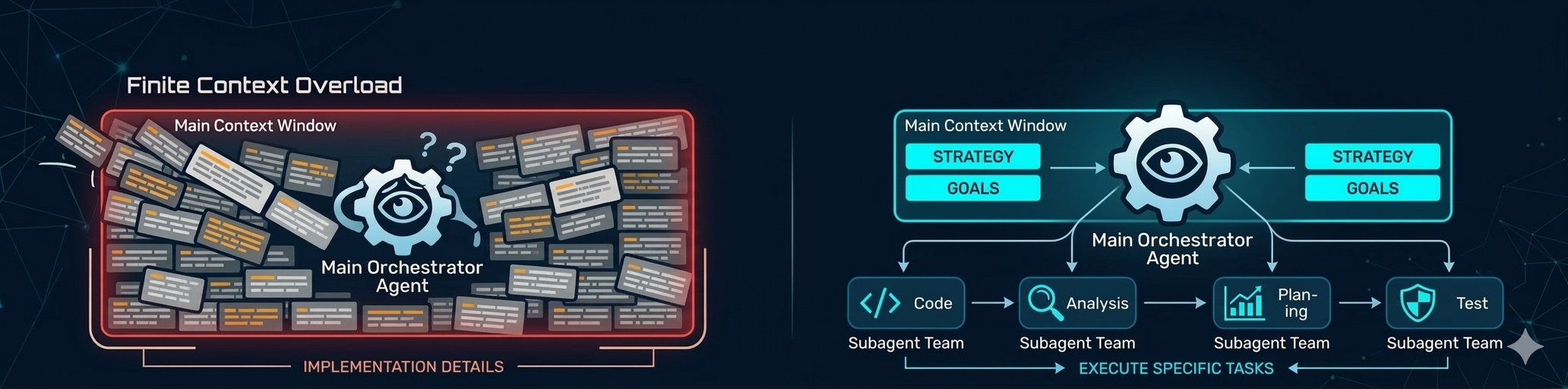 Context windows are finite. Every token spent on implementation details is a token not spent on strategy. And it isn’t just running out of context that’s the problem; the more you stuff into the context window the harder it is for the agent to know what parts of the context are important.
I use subagents to preserve the main working context for as long as possible. Main context orchestrates. Subagents execute specific tasks.
Think of it as delegation: the orchestrator maintains the big picture, subagents handle the details. This keeps the primary context focused and prevents it from getting polluted with low-level noise.
Subagents let you parallelize work and keep the main thread clean. Orchestration scales better than monolithic agents trying to do everything. The more you delegate, the longer your main context stays coherent.
Good architecture applies to agent workflows, not just code. Preserve the context that matters most by offloading what doesn’t.
3. Pair Tasks with Automatic Code Review
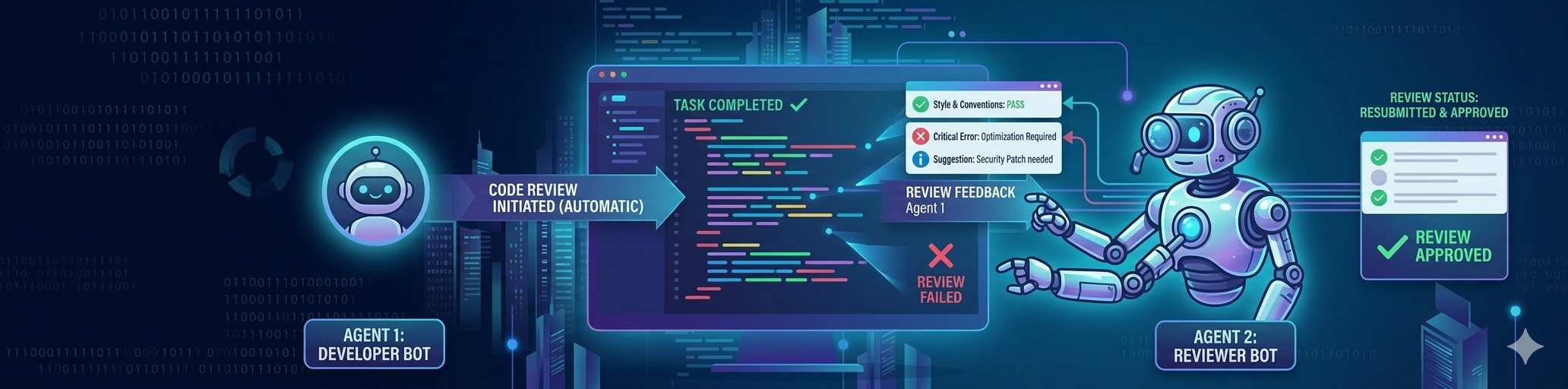 Every task an agent completes is immediately followed by an automated code review from another agent.
Not when I remember to do it. Not when I have time. Automatically, and built into the prompts use use.
- Implement/fix Feature A using a subagent
- Perform a thorough code review using a subagent
- Address all code review feedback using a subagent
- All quality gates must pass (unit tests, CI, UI flows, etc)
Agents are fast but not infallible. They miss edge cases. They make assumptions. They introduce subtle bugs that pass tests but fail in production. A second set of eyes — even synthetic ones — catches problems before they compound.
Reviewing immediately means fixes are cheap. You’re still in the same mental space. The agent still has context. Waiting turns a five-minute fix into an archeological dig.
Think of it as a two-agent assembly line: one builds, one inspects. Always. Code review isn’t about distrust. It’s about preventing errors early on via multiple layers.
Agents will make mistakes, so you plan for them to happen, and build mechanisms to catch/prevent them.

4. Run Periodic Security and Architectural Reviews
Code review catches bugs in commits. Periodic reviews catch drift in the system.
I schedule regular deep reviews: security audit, architectural analysis, dependency checks. Every one to two weeks during active development, or after any substantial feature addition.
This isn’t scrutiny of individual commits. It’s scrutiny of the codebase as a whole. Small changes accumulate into architectural drift. Patterns break down. Security assumptions shift. Complexity creeps in faster than you notice it.
This is preventative maintenance, not crisis response. You’re not fixing a bug. You’re making sure the foundation is still solid. Regular checkups ensure that the components in the system follow good engineering practices (i.e. small, single responsibility, testable, etc). Having a well-designed codebase makes it easier for agents to work in your code1.
5. Build Robust Test Harnesses
Robust tests let you give agents autonomy. “Implement X and ensure all tests pass” becomes a delegation you can trust.
Writing test code is essentially free with agents. There’s no excuse for not having comprehensive coverage. I build unit tests, integration tests, CI checks, end-to-end flows. Every new feature gets new tests. Add code coverage with merge-checks; this ensures that a) your agents doesn’t delete/disable tests on a whim, and b) you have a consistent coverage base to work from.
Tests are your contract with the agent: “Don’t break this.” With good coverage, you can delegate entire features and trust the agent to stay within bounds. Tests catch regressions immediately, not three weeks later when a user reports a bug.
Test harnesses turn “I hope this works” into “I know this works.” The better your tests, the more autonomy you can safely give agents.
The upfront cost is low. The ongoing value is high. Build the harness early. Thank yourself later.
6. Clean Up Cruft Regularly
Agents generate artifacts fast. Markdown plan files, old drafts, unused scripts, commented-out code. It piles up.
I schedule regular cleanup sessions to clear out the mess. Not because I’m precious about tidiness — because cruft makes it harder for the agent to know what matters.
The agent has to wade through noise to find signal. Old plan files confuse intent: “Is this still the plan, or was it superseded?” Clutter slows down search, grep, mental model-building. A clean codebase is easier to reason about.
Think of it like pruning a tree. The goal isn’t aesthetic. It’s structural. Remove what’s dead so the living parts can grow.
7. Be Precise About Outputs, Not Prescriptive About Process
Tell the agent what you need, not how to build it.
Define the expected outcome clearly: “A function that does X, handles Y edge case, returns Z format.” Then let the agent figure out the approach.
If you’re dictating every line, you’re not using the agent to its full potential. Agents are capable of finding good solutions if you give them room to work. Over-specifying the process constrains the agent to your mental model, which might not be the best one.
Precision about outcomes ensures you get what you need. Flexibility about process lets the agent optimize.
The goal is results, not compliance with your preconceived method. Trust the agent’s reasoning unless you have a specific reason not to.
Note: this isn’t an excuse not to review the approach. You should always ensure the agent is taking a sane approach and nudge it in the right direction if it is steering off course.
8. Break Large Tasks into Stages
For big projects, don’t jump straight to implementation.
Stage one: design and architecture. Plan the approach. Identify components. Outline interfaces. Get alignment on the structure.
Stage two: implementation. Build the thing based on the agreed design.
Breaking it up gives you checkpoints to course-correct before you’re deep in the weeds.
Large tasks have more surface area for mistakes. Catching them early is cheaper. A design phase forces you — and the agent — to think through the problem before committing to code. You can review and adjust the plan before hundreds of lines are written.
Staged work preserves flexibility and reduces waste.
Speed is valuable. Thoughtless speed is expensive. Plan first, implement second — even when the agent is doing both.
Conclusion: Patterns Evolve with Practice
These list isn’t exhaustive nor is it universal, they’re what works for me, refined through practice.
Your context is different. Your codebase, your risk tolerance, your workflows. What breaks for you won’t be what breaks for me. What saves you time might not be what saves me time.
Feel free to use, adapt or ignore. The best patterns are the ones you discover by working with agents in production, not by reading about it. Pay attention to what breaks, what slows you down, what saves you. Those are signals.
Build your own playbook.
Footnotes
-
Research shows that AI code agents struggle with complex, disorganized codebases. All leading AI coding tools encounter context challenges with codebases of 100K+ files, and 26% of developer improvement requests focus on “improved contextual understanding.” Additionally, a 2026 study found that poorly organized codebases lead to increased static analysis warnings and code complexity, which become major factors driving long-term velocity slowdown. Well-designed, clean codebases directly improve agent performance. Sources: AI Coding Tools for Complex Codebases 2026 and Speed at the Cost of Quality ↩